
Helpful Registration Hints:
If you are having issues viewing the registration page, clear your shopping cart, log out and try using a different browser. Also we have found that zooming out to 75% helps allow you to see the whole registration screen.
Your Shopping Cart, which is where you register for membership, can be accessed in the very top right corner of our website under "My Shopping Cart". You will see a blue "1" in there if you have added your registration to the cart already. Click on the blue "1" - you will then get a prompt to "Checkout Now" Click on that and begin your registration.
Please review the following instructions prior to starting your registration process:
Scroll to the bottom of this page to select the membership you are looking to renew - you will see 3 red "ADD TO CART" buttons (if you do not see them, you should try zooming your screen out to 75%)
You will see a drop down at the top that says "CHECKOUT NOW" - click that. If that goes away, you can access your shopping cart in the top right corner of the screen, click on MY SHOPPING CART and then click CHECKOUT NOW
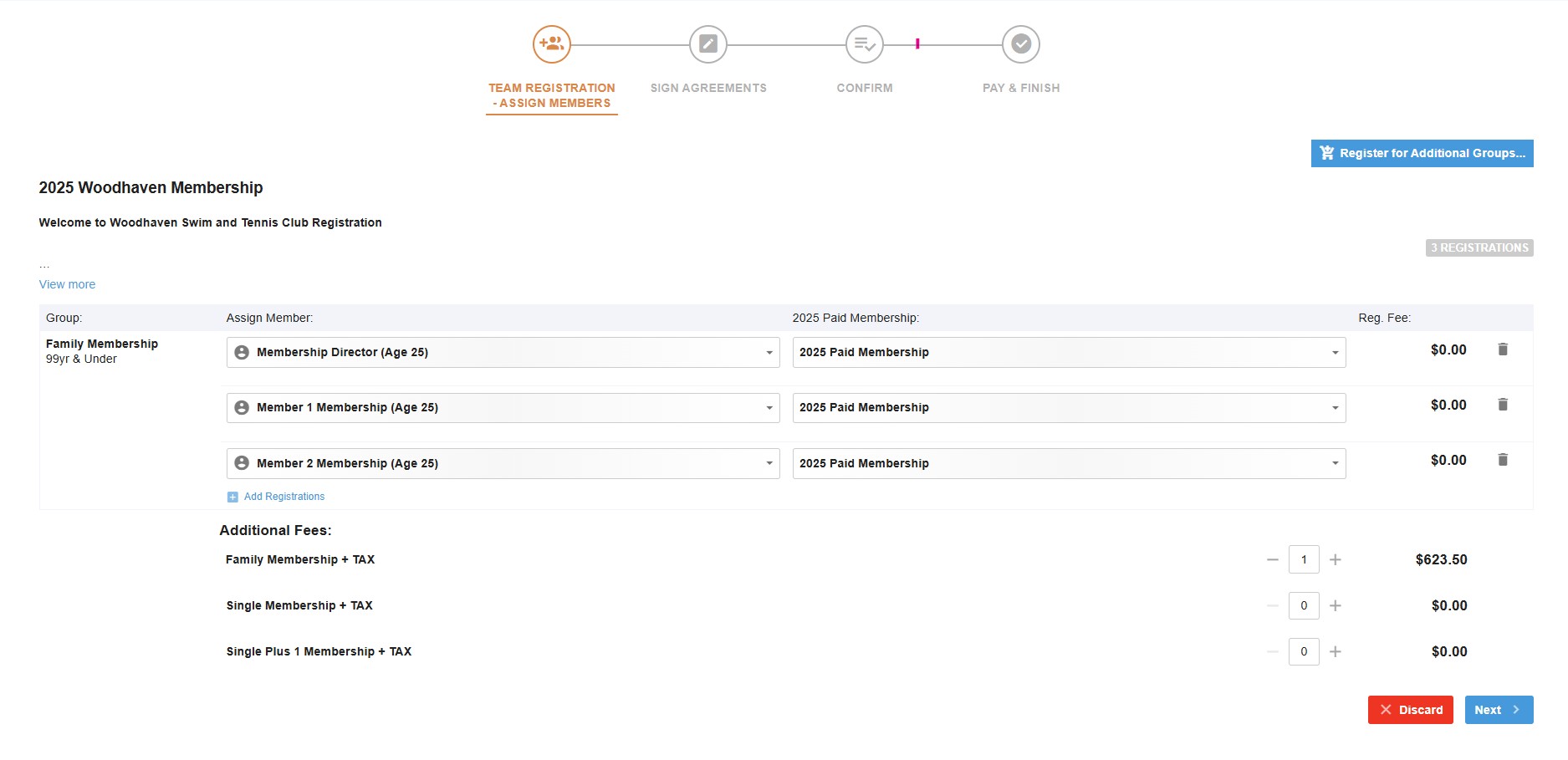
On the next screen you will need to add all members to your membership under ASSIGN MEMBER, add the account holder first in the drop down box.
To add additional members, click ADD REGISTRATIONS (blue button under first member name) to add your additional family members.
On the same screen, you MUST add in the membership option you are looking to purchase. There will be 3 options at the bottom under Additional Fees.
If your membership charge is $0.00 then you have not selected the membership you are looking to renew. Click the + next to the membership you are looking to purchase, this will then add the charge to your cart.
Once you have added all your family members and your membership charge, click NEXT in bottom right corner
Review and accept the Liability Wavier and Medical Release Waivers then click NEXT in bottom right corner
Review the charges and click NEXT in bottom right
Add your payment on this screen then click "Pay Now"
Remember - if the charge is $0.00 you need to click the BACK button (bottom left) and go back to the following screen.
BELOW IS A SCREEN SHOT THAT WILL SHOW YOU WHAT YOUR SCREEN WILL LOOK LIKE IF YOU SELECT THE FAMILY MEMBERSHIP - KEEP SCROLLING DOWN TO SEE THE REST OF THE INSTRUCTIONS AND ON TO YOUR OWN REGISTRATION:
The rates have tax included in them!
Family Rate: $580 + Tax $43.50
Single +1 Rate: $465 + Tax $34.88
Single Rate: $375 + Tax $28.13
I hope the above helps with the process.
Woodhaven does offer a 20% discount for our Active Military members. See the main website for the link under Forms to complete the Military Discount Request Form!
To begin your registration, select the membership you wish to register for below:
*If you're not seeing the red buttons to click in order to select the membership you are looking to renew, then zoom out your screen. We have found that the buttons are not always showing up without the screen zoomed out.
*If you are looking for the above screen but can't find it - look in the top right corner and look for "My Shopping Cart"
