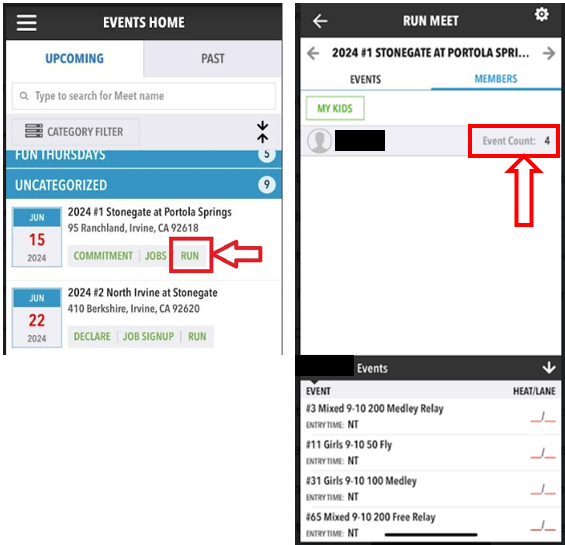
After a swimmer is declared/committed for a swim meet, the coaches will assign him/her to events for the meet. You can locate the assigned events on the Seahawks website or through the OnDeck app.
Swimmers assigned to a Medley Relay race (Events #1-6) must report to the Ready Bench area right before the meet starts (typically right after the National Anthem). Please listen for announcements and look for Seahawks Coaches so that your swimmer does not miss his/her relay race!
How To Find Your Swimmer's Events on our SportsEngine Website
- Sign-in to your TeamUnify/SportsEngine account of the team website.
- Go to the Team Calendar tab (or Events & Competition > Team Events).
- Select "Edit Commitment" for the meet you want to check, e.g., 2024 #1 Stonegate at Portola Springs.
- At the bottom of the Athlete SignUp page, you will find your swimmer's events for that meet including Relays if the swimmer has been assigned to one.
How To Find Your Swimmer's Events on the OnDeck App
- Sign-in to your OnDeck App
- Go to Events & Jobs > Events & Meet Entries
- Click on "Run" for that Meet
- Click on 'Event Count' to view the assigned events